Your Guide to 7 New Features That Make ChatGPT a More Productive Workspace
OpenAI has launched a package of updates within ChatGPT, transforming the platform from a smart chat space to an interactive collaborative workspace, allowing users to accomplish work tasks more productively.
Ofoq News
·7 minutes read
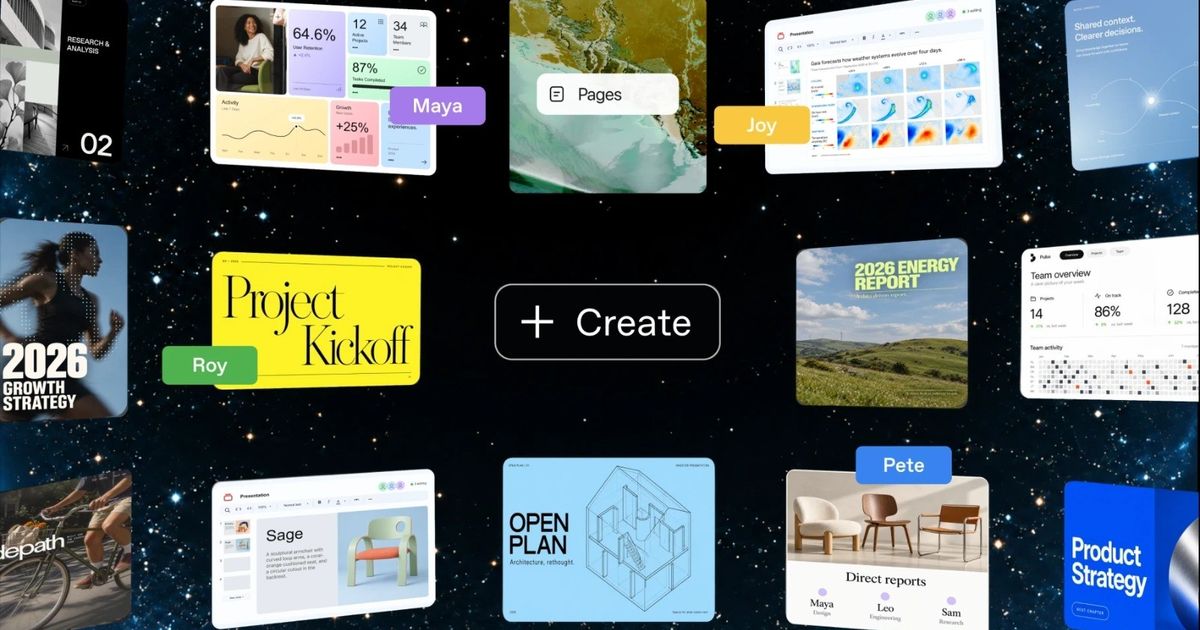
OpenAI has launched a package of updates within ChatGPT, transforming the platform from a space for smart chatting into an interactive collaborative workspace, allowing users to accomplish work tasks more productively.
This includes providing tools that enable the creation and editing of files in various formats directly within the platform, in addition to new features that facilitate the use of ChatGPT as an AI tool within other digital services outside the platform.
During its annual conference event DevDay 2026, the company introduced a new generation of smart agents called Dots, which can monitor tasks assigned to them by users around the clock, operate autonomously, and learn on their own, alongside offering a revolutionary feature called Proactive Research, which allows the agents to work and research within the different contexts of users' files and conversations with them, identifying tasks and information that the user might overlook but are important, and starting to handle them automatically and returning to the user upon completion to keep them informed of everything happening at all times, even in the background of work.
The use of ChatGPT is expanding within homes as it becomes increasingly relied upon by families and parents, coinciding with the development of parental control tools and experiences suitable for various ages.
Another announcement reflecting ChatGPT's transformation into a direct competitor to traditional productivity tools is ChatGPT Space.
The company described Space as a shared space that brings together team members, ChatGPT, Dots, files, and documents in one place, allowing everyone to work based on the same common context.
Space replaces Library for eligible subscribers, becoming the place where files, pages, presentations, and spreadsheets created or uploaded by the user are stored.
Users can give permanent instructions for a specific page, such as following the team channel, extracting important developments, automatically updating the page, or following email, calendar, and Slack to update the task list and appointments.
Space also allows inviting team members, granting them viewing or editing permissions, and working simultaneously on the same content.
The service is available to Pro, Business, and Enterprise subscribers on the web and desktop application, while the mobile app currently allows finding, reading, and sharing pages, with the creation and editing process via smartphones to be available later.
Inside Space, OpenAI introduced the Pages feature, a tool for creating interactive documents designed from the ground up for collaboration between humans and AI agents.
The page can be used for writing, researching, creating charts, images, visual tools, and programming, with the ability to invite colleagues for real-time editing and leave comments.
Users can mention ChatGPT, Codex, or Dots within the document and request a modification or a new step to be executed.
OpenAI launched new AI agents called Dots, designed to work continuously on behalf of the user and perform multiple tasks in parallel across different applications and services.
Pages can also be linked to external applications and services, allowing ChatGPT to utilize information from Google Drive, Slack, and others to update documents.
Automation allows the user to specify the sources to be reviewed and the update schedules, turning the page into a Living Document instead of a static file that employees need to update manually.
The company revealed Collaborative Slides for creating presentations directly within ChatGPT.
Users can start the presentation simply by having a conversation with ChatGPT, or by using a template specific to their team, and then edit the slides in collaboration with colleagues and digital agents simultaneously.
Members can leave comments, request modifications from ChatGPT, while the user can present the slides directly from within the platform, or export them to PowerPoint or Google Slides while maintaining the formatting.
However, the feature will not be available immediately; the company stated that it will reach Pro, Business, and Enterprise users in the coming weeks.
OpenAI indicated that collaborative spreadsheets will later arrive in Space.
Pages, Slides, and Space could put the company in more direct competition with traditional productivity suites, especially Microsoft 365 and Google Workspace, but with a different model where AI tools are an integral part of the document itself, rather than just a side assistant.
OpenAI introduced the Teams feature within ChatGPT, which allows a group of employees to share pages, presentations, add-ons, and spreadsheets.
Team members can delegate repetitive tasks to ChatGPT, such as preparing a weekly update for a project.
The platform can gather information from connected applications and execute tasks according to a schedule, or as soon as a specific event occurs, such as receiving a new email or a message on Slack.
The feature is available to Business and Enterprise subscribers.
OpenAI also added a Meetings Plugin, which is a dedicated add-on for taking meeting notes and creating a personal summary for each user that includes Action Items.
The notes are then transferred to the ChatGPT Space, allowing the user to request an update on a project plan or draft a follow-up message based on them.
The company confirmed that the audio recording itself is deleted once the notes are prepared and cannot be accessed or replayed afterwards.
The beta version is currently available to Pro and Business subscribers via the ChatGPT app on macOS, with Enterprise access coming later.
OpenAI continues to expand the concept of Plugins within ChatGPT, allowing developers to create complete interfaces for their applications within the platform.
Plugin Extensions allow the application to be placed in the sidebar within ChatGPT, creating interactive Panels through which the user works alongside the conversation, in addition to creating custom tools for browsing the types of files supported by the application.
The company launched Plugin Creator to facilitate the building of plugins, redesigned the submission procedures for review, and developed algorithms for ranking and suggesting applications within the Plugin Directory and conversations.
It is now also possible to add Plugins to ChatGPT Sites, allowing team members to use the same application while retaining individual login data and permissions for each user.
The new system also supports the proposed MCP Events standard, allowing connected applications to automatically trigger Automations when a specific event occurs.
For example, a user can ask ChatGPT to follow a project management board, and when a new task is added, the system can automatically open the related documents and prepare a work plan.
ByteDance announces the launch of Doubao 2.0 with multi-tasking capabilities and advanced reasoning, in direct competition with ChatGPT and Gemini, while reducing usage costs to attract developers.
One of the most significant changes that expands OpenAI's influence beyond its application is the launch of Sign in with ChatGPT.
This service allows users to log into external applications and websites using their ChatGPT account, similar to Sign in with Google or Sign in with Apple options.
However, the company added an additional layer; Plus and Pro subscribers can allow certain applications to use the existing AI quota in their ChatGPT subscription, instead of needing to enter a separate API key.
The launch list includes 16 partners, including Devin from Cognition, Notion, Vercel, T3, OpenClaw, and Dactyl.
Eligible usage for these applications counts against the user's ChatGPT Work and Codex quota.
Users can also set a weekly limit for each application individually and check how much usage they have consumed from Settings and then Usage.
Logging in this way does not automatically grant the application access to the user's conversations or memory within ChatGPT, nor does the application receive its own OpenAI API key.
The announcements from DevDay 2026 reflect a shift in the competition that OpenAI is facing, as the company is no longer solely focused on the race between GPT models and competitors like Anthropic and Google, but has expanded into other layers including productivity tools, programming environments, enterprise applications, employee collaboration platforms, and the infrastructure for digital agents.
This is clearly evident in Space, Pages, and shared presentations, which approach the core functionalities of Microsoft 365 and Google Workspace, while Dots takes the idea a step further by offering a persistent digital agent that does not wait for the user to initiate a new conversation each time.
On the other hand, Sign in with ChatGPT, Plugins, and Marketplace open the door for the company to make ChatGPT subscriptions themselves a means to access AI applications outside the platform.
Thus, OpenAI's main bet is no longer for ChatGPT to be the application users turn to just for answers, but rather to become a shared operating layer where conversations, documents, applications, programming, and agents intersect, and tasks continue within it even when the user is not in front of the screen.
Source: Ofoq News
Suggested
Read also
 Politics
Tripartite Meeting Between Egypt, Chad, and Libya Discusses Security in the Sahel and Sahara Region
 Politics
United States.. Woman Arrested on Suspicion of "Espionage for China"
 Politics